

Code Push for Android Hybrid Apps
This guide explains how to use Patchwing in an Android hybrid app scenario (that is, your app embeds Flutter UI in non-Flutter UI).
Prerequisites
Section titled “Prerequisites”This guide assumes you have already have an Android app and a Flutter module.
Our Android app will be named android_app and our Flutter module will be named
flutter_module.
This guide also assumes that you have created a Patchwing account. If you have not, please see our code push guide for instructions.
The reference code for this guide is available at https://github.com/AstralWing/samples/tree/main/add_to_app.
Add Patchwing to your Flutter module
Section titled “Add Patchwing to your Flutter module”First, run patchwing init in your Flutter module:
Create a Patchwing release
Section titled “Create a Patchwing release”Create a Patchwing release for your Flutter module:
The release-version parameter needs to match the version of the Android app
that uses this module (i.e., versionName+versionCode from the app’s
app/build.gradle file).
Update your Android app to use the download.patchwing.net Maven repository
Section titled “Update your Android app to use the download.patchwing.net Maven repository”In settings.gradle:
Update your Android app to use this version of the Flutter module
Section titled “Update your Android app to use this version of the Flutter module”In app/build.gradle, add the following:
Verify that your app runs
Section titled “Verify that your app runs”In Android Studio, update the active build variant to release and run your app. Your app should work as before with no differences.
To set the active build variant to release, click on the “Build Variants” tab in the lower left corner of Android Studio. Then select “release” from the “Active Build Variant” dropdown.
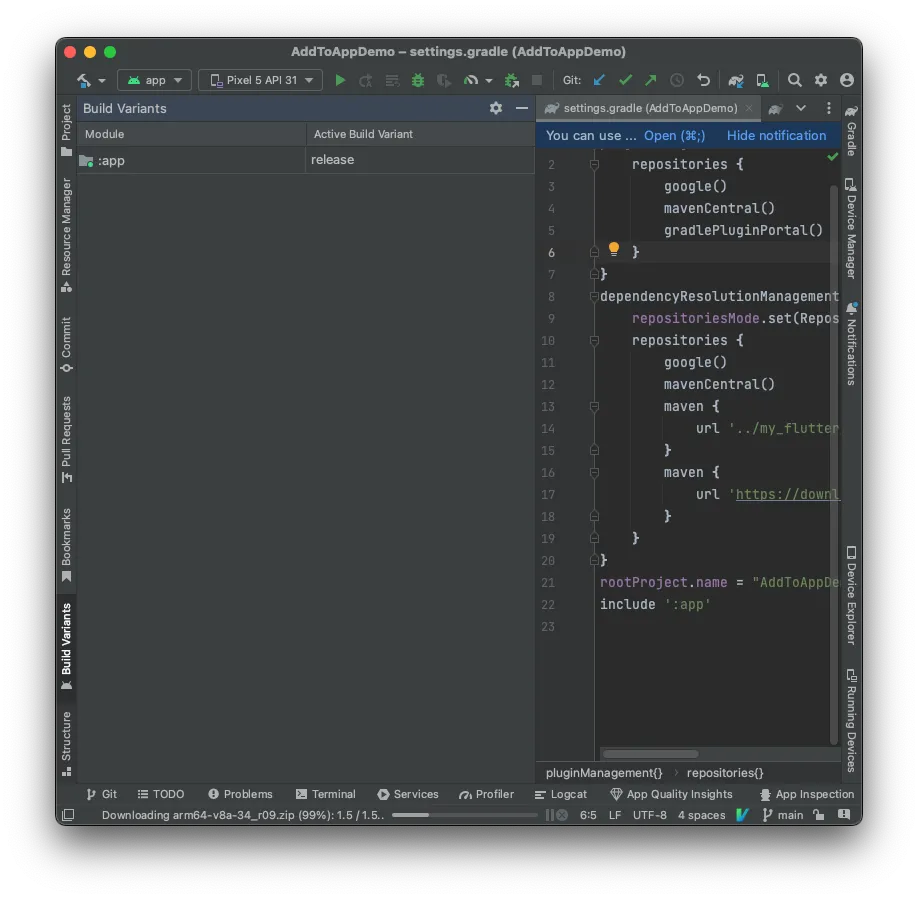
Attempting to build with a non-release build variant will not be able to resolve Flutter symbols in your app.
Submit your app to the Play Store
Section titled “Submit your app to the Play Store”We won’t cover this step in detail here, but this is where you would submit your
app to the Play Store. For code push to work, it is important that you submit
with the same aar generated by the release command above.
Verify that Patchwing is working with a patch
Section titled “Verify that Patchwing is working with a patch”Make an edit to the code in your Flutter module. Then run:
As with the release command, the release version should be the version of the
Android app that uses this module.
Now relaunch the app, navigate to the Flutter screen, and verify that the patch is recognized and applied. In logcat, you should see output like the following: